Multi-Channel E-commerce
The multichannel mode is available on the Individual plan.
What Is Multi-Channel E-commerce?
Multichannel e-commerce is a strategy that allows businesses to sell their products or services across multiple platforms, marketplaces or websites beyond their own primary website.
Typical Examples
- Selling in several countries. You run a German shop in euros and a Hungarian shop in forints, each with local taxes, shipping zones and payment options.
- B2C and B2B side by side. You run a public retail store and a wholesale portal for registered business customers only, with a different product range and payment terms.
- Several brands or websites. Two brands with different websites and designs share one inventory and one order management.
- Several legal entities. Sister companies each sell under their own name and receive payments into their own accounts, while running on the same system.
- Selling on different platforms. You run a shop on Amazon, eBay, emag or any other Marketplace.
- Integrating with white-label resellers. Your partners operate their own shops, but you receive the orders and fulfill them.
Multi-channel features can be used to:
- expand market reach;
- provide customers with a seamless shopping experience regardless of where they choose to purchase;
- integrate with third parties;
- segment the business logic.
What is a Channel?
A channel is a separate sales outlet inside your Vanilo shop. It has its own rules, but it shares the same back office as the rest of the shop.
Each Vanilo shop has its main configuration, which affects the behavior of the shop.
Without channels, a shop has one set of settings, and they apply to everyone and everything: every customer, every product, every payment, every order. That works well when you sell in one way, to one market.
Channels are for when you need more than one way of selling. Each channel is its own part of the shop that can work differently from the others. You still manage all of them from a single admin panel, with one product catalog and one order system.
What Can Be Different in a Channel?
- Who sells, and where: Each channel can have its own merchant (the company that legally sells to the customer), language and currency.
- Where you deliver and bill: A channel can define which regions it ships to and which billing addresses it accepts.
- What is for sale: Each channel can offer its own selection of products from the shared catalog. It doesn't have to sell everything.
- How customers pay and receive goods: A channel can have its own payment and shipping methods. It can also use its own payment provider account, so the money goes to the right company account.
- Taxes and business rules: Tax settings can differ per channel, for example for different countries. So can the checks applied to orders and customer data, such as which fields are required.
- How it looks: A channel can have its own storefront, which can be a completely different website with its own design and domain.
- Who can buy: Customers can belong to a specific channel. This is useful when only certain customers should have access to it.
When you Don't Need Channels
If you sell through one website, as one company, in one market, with one set of rules, you don't need channels. The main shop configuration covers everything.
You can add channels later, when you expand to new markets, customer groups or brands.
Channels
To use multichannel features, you'll need one or more channels. You can create one using the admin panel or the REST API.
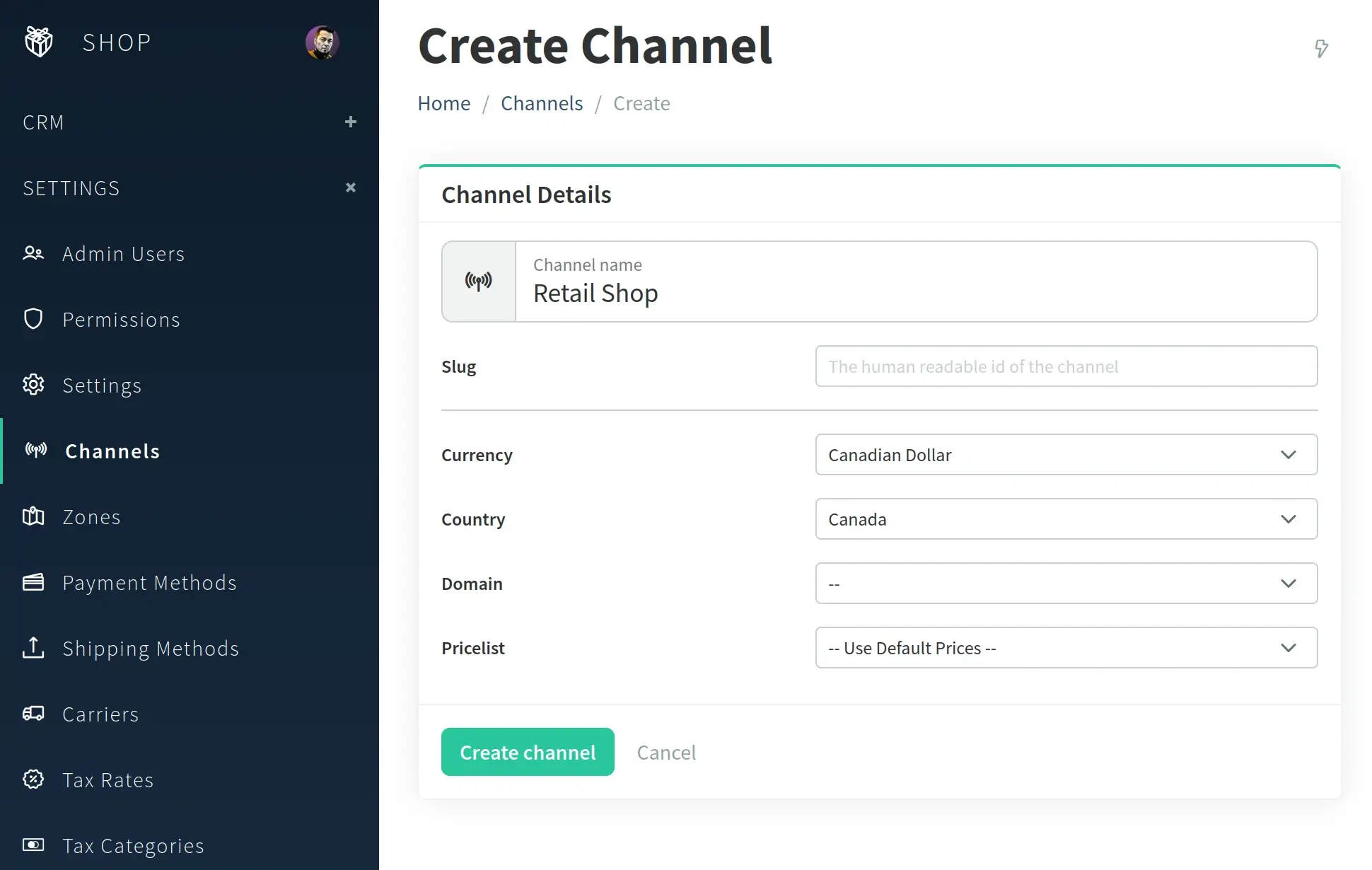
A channel's only mandatory field is the name, the rest of them are optional.
Binding to Domains
Your shop's StoreFront, including the StoreFront API can be made available on multiple domains. By default, the shop is not bound to any channels, which means it has access to all data (products, customers, categories, shipping and payment methods).
The simplest way of using channels is to bind a channel to a domain. That can be done by choosing the domain from the dropdown at create or edit channel on the Admin Panel. Doing this, any request coming to the StoreFront or the StoreFront API via the selected domain will be scoped to that channel.
Channel scoping means:
- Only the products that are assigned to the given channel will be listed.
- Products that aren't enabled for the channel will give 404.
- Products unavailable for the channel can't be added to orders via the StoreFront API.
- Only the payment and shipping methods that are enabled for the channel will be available.
- The channel's shipping and billing countries will be enabled on the checkout (with fallback to the shop defaults).
- If the channel has a custom pricelist selected, the prices will be taken from that pricelist.
- If the channel's pricelist is net-based (excludes taxes), then that will be taken into account at tax calculation (if enabled).
- Orders created will be:
- assigned to the respective channel,
- have the currency of the channel (with fallback to the default)
- have the language of the channel (with fallback to the default)
Configuration
Turning On
The multichannel feature is turned off by default. To enable the multichannel mode in your shop,
modify the vanilo.json configuration file:
{
    "features": {
        "multi_channel": {
            "is_enabled": true
        }
    }
}
Channel Configuration File
Channels, by default, inherit the configuration from the main shop config. The config/channels.json file allows
overriding the main configuration for each channel.
The format is a JSON object with the following structure:
{
    "channel1": {
      "validation": {
        "checkout": {
          "shippingAddress": {
            "postalcode": "required|numeric|size:4"
          }
        }
      }
    },
    "channel2": {
      "validation": {
        "checkout": {
          "shippingAddress": {
            "postalcode": "required|numeric|size:6"
          }
        }
      }
    }
}
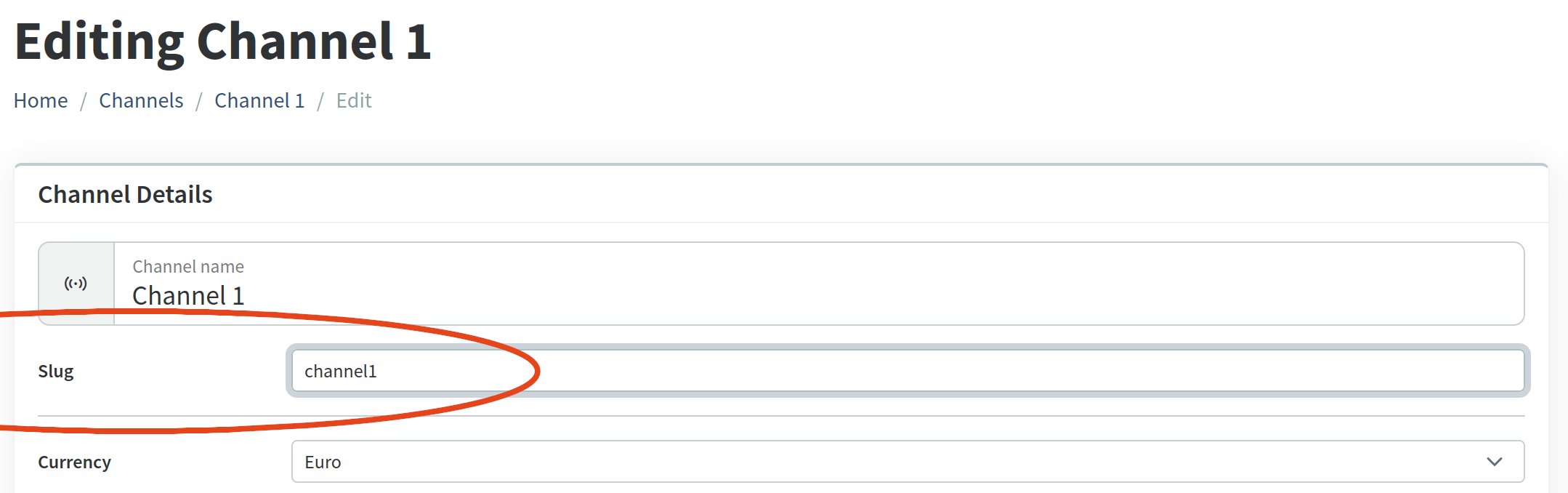
The channel1 and channel2 values are the "slugs" of the channels, as seen on the Admin Panel:
Validation Rules
It is possible to define custom validation rules for each channel. This will override the shop-level validation rules.
See the Customizable Validation Fields on Checkout for a detailed reference of the fields.
The channel-level validation rules need to be added to the config/channels.json configuration file:
{
  "channel1-slug": {
    "validation": {
      "checkout": {
        "email": "required|email:rfc,spoof,dns",
        "billpayer": {
          "firstname": "required|min:2|max:255",
          "address": {
            "postalcode": "required|min:6|max:7"
          }
        }
      }
    },
    "channel2-slug": {
      "validation": {
        "checkout": {
          "shippingAddress": {
            "postalcode": "required|size:4"
          }
        },
        "registration": {
          "name": "sometimes|nullable|max:50"
        }
      }
    }
  }
}
Payment Configuration
It is possible to define custom configurations for payment drivers for each channel. This will override the shop-level configuration.
See the Payment Configuration for a detailed reference of the fields.
The channel-level configuration needs to be added to the config/channels.json configuration file. Only the values that
are provided will overwrite the default (shop-level) configuration.
Sample:
{

  "channel1": {
    "payment": {
      "mollie": {
        "api_key": "api key used by channel 1"
      }
    }
  },

  "channel2": {
    "paypal": {
      "client_id": "the PayPal client id used by channel 2",
      "secret": "the PayPal secret used by channel 2"
    }
  }

}